Our phone is often our worst enemy when it comes to productivity. We have to admit that for many of us, we cannot live without it anymore. Even going to the bathroom without our phone has become almost impossible.
In my previous article, A receipt printer cured my procrastination, I explained how I used post it notes and later a receipt printer to fight my chronic procrastination. If I had to summarize that article in one sentence, it would be this, break a task into micro tasks and write them on a tangible and disposable medium.
The problem with these two methods is the following:
- Post it notes become painful to use over time
- A receipt printer is not affordable for everyone
For a long time, I had an idea to build a small tool that would allow me to use my phone or tablet as a productivity copilot. In reality, this idea was not simple at all. I probably have more than ten pages of notes and at least five very different versions of this tool, without ever finding a perfect solution that met all my needs.
Over the past few weeks, while looking for a solution that could work for as many people as possible, I found a simple approach and built a free tool that I called Stack.
Because I hate typing text on my phone and I am much faster on a computer keyboard, I split the tool into two distinct parts:
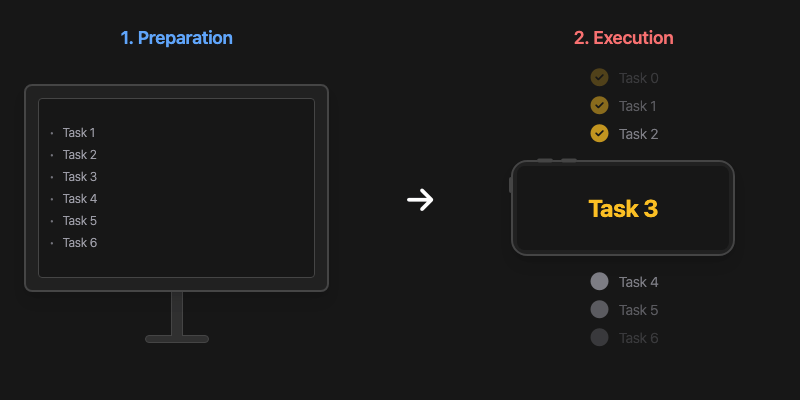
Preparation: On your computer, prepare your tasks in a large text field. Each line is a task. You can also paste tasks from other tools like Notion or Things 3. Once ready, you launch your “stack”.
Execution: With your phone, you scan the QR code displayed on the web page. This launches a small application that will display task after task from your list. Place your phone in front of you and start executing your tasks.
The advantage of this system is that you always have your tasks visible in front of you, making them hard to ignore.
Before explaining the other side of the tool, here is a small productivity hack inspired by video games. You may know the concept of speedrunning a video game. The goal is to finish an entire game as fast as possible, following a set of predefined rules. The most important idea here is time. This approach can work extremely well and can even become fun, even if you have already finished the game many times.
The idea is to reuse this concept in the app in a very simple way. You can add a timer, and this timer has three configurations:
- Until: you set an end time
- Duration: you set a total duration
- Pomodoro: you set a work duration and a break duration
While executing tasks, you will see a progress bar at the top that shows how many tasks are completed compared to the total. If you selected a timer, a second progress bar will appear based on time. The goal is to keep the task progress bar ahead of the time progress bar.
Task progress: 6/10 completed
Time progress: 27:00 remaining
The impact of using this simple technique can be massive. Here are the main benefits that come to mind:
- If you have a long and boring task list, setting a time goal can turn it into a challenge
- If you are a perfectionist, it can remind you that spending too much time on one task is counterproductive
- If your mind tends to wander and you often switch to other activities, the stack and the timer help you stay focused on your work and on the passing time
However, don’t try to make precise estimates of how long your tasks will take. The idea is rather to set a timer based on your next break, the end of your work, or a session. For example: I try to complete as many tasks as possible before my 3 PM session.
That said, the tool also has some drawbacks that are important to mention:
- Even though the tool is free and accessible without login, tasks must be stored in a database so they can be accessed from two devices. These data are automatically deleted after a certain amount of time
- You need to enable an option on your phone to keep the screen on and prevent it from going to sleep
- You obviously need to turn off all notifications on your phone to avoid adding another source of distraction
- This obviously has an impact on battery life. You can also use an extra screen connected to your computer and display the stack in full screen, or use an old phone or tablet. It only needs an internet connection and does not have to be powerful
- Since this is a mobile web page, there are some limitations, for example on iOS the app cannot run in full screen
- I am currently preparing a version that can be installed directly on iOS and Android, subscribe to my newsletter to be informed when it is released
Stack is now available in the latest version of my application Colonnes.
Colonnes is a task management application that allows you to break tasks into smaller tasks infinitely. You can then print them on a receipt printer or use Stack to execute your tasks. Colonnes is ultra-fast to use (more than 80 keyboard shortcuts, command menu, local-first).